I’ve promised you that when my patch set with tagging UI will be accepted I’ll describe all features that are implemented. Patch set were accepted and merged during GeeCON conference so that I can’t done that immediately after it happened. Now when everything back’s to normal I can present you new feature of EGit that will be available in 0.8.0 release.
Creating tag.
To create tag select ‘Team -> Tag…‘ from project’s context menu. After this you should see dialog window similar to this one:

If you start typing tag name into ‘Tag name‘ field, the ‘Existing tags‘ list will be filtered based on typed value also you are informed that this tag name already exists and you cannot create such tag:
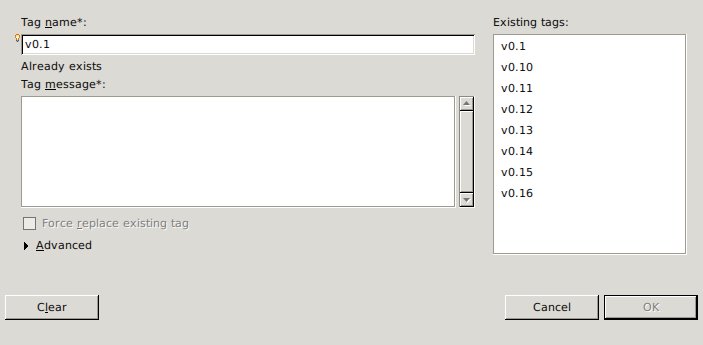
Right now we only support creating unsigned annotated tags, so after you choose unique name for your’s new tag you must fill in ‘Tag message‘ filed with message that will be associated with this tag.
Now when you have both fields filled in you can click ‘OK‘ button (or ctrl + enter) to create tag that will be associated with current HEAD. In case if you want to associate tag with specific commit you should expand ‘Advanced‘ section (just simply click on ‘Advanced‘ text) where you can find select box that contains list of all commits. This input have special suggest feature, just start typing commit’s SHA-1 or part of first line of existing commit messages to see suggestions:
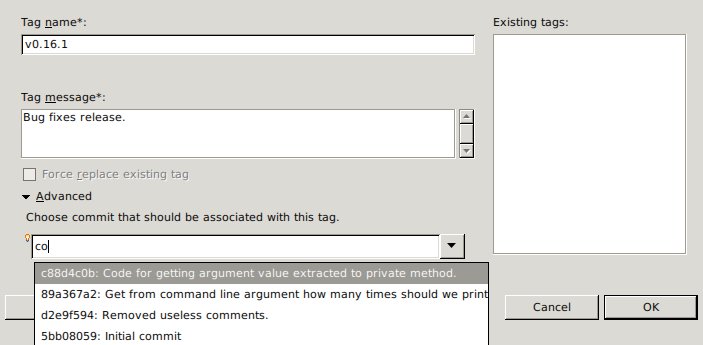
Then you can select commit that will be associated with new tag from filtered list of commits.
Editing tag.
In case of editing already existing tag (changing tag message or associated commit) you should select ‘Team -> Tag…‘ from project’s context menu. Click on tag name that should be changed in ‘Existing tag list‘ (you can also filter that list by typing in tag name into ‘Tag name‘ filed):
<img class="aligncenter size-medium wp-image-578" title="egit-tagging-ui-3" src="https://luksza.org/wp-content/plugins/speed-booster-pack/inc/images/1×1.trans.gif" data-lazy-src="https://luksza.org/wp-content/uploads/2010/05/egit-tagging-ui-3-300×147.jpg" alt="" width="300" height="147" srcset="https://luksza order cialis overnight.org/wp-content/uploads/2010/05/egit-tagging-ui-3-300×147.jpg 300w, https://luksza.org/wp-content/uploads/2010/05/egit-tagging-ui-3.jpg 703w” sizes=”(max-width: 300px) 100vw, 300px” />
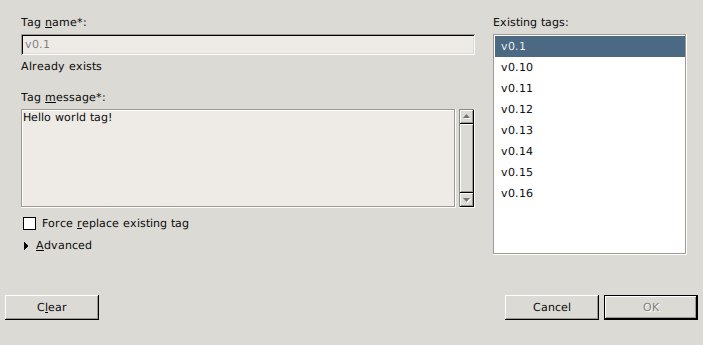
As you can see I’ve selected ‘v0.1’ tag. Right now ‘Tag name‘ and ‘Tag message‘ fields are disabled (also tag associated commit field in advanced section is disabled), you can enable it by selecting ‘Force replace existing tag‘.
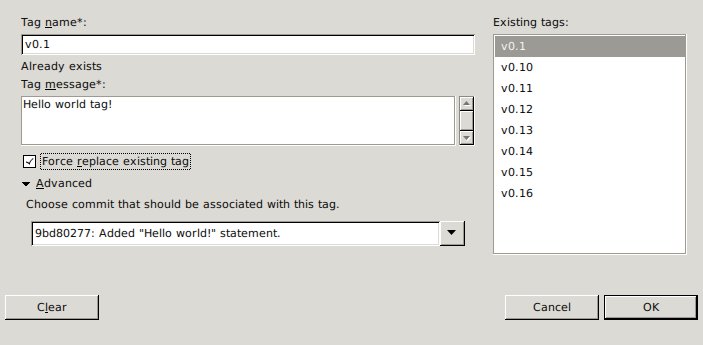
Now you can easily change tag message and/or commit that is associated with this particular and then approve that changes by clicking on ‘OK‘ button.