
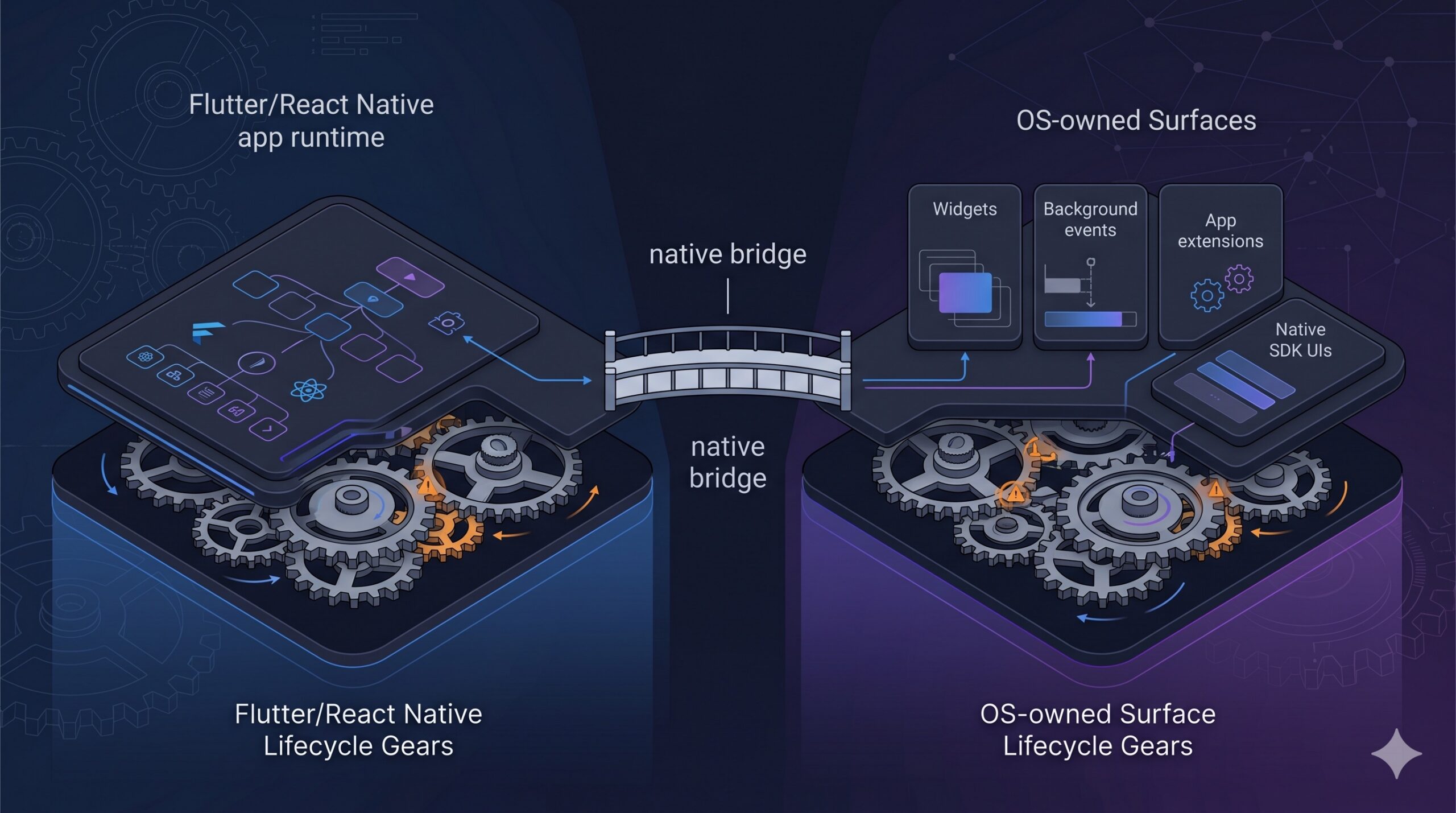
The main cross-platform frameworks have come a long way. Flutter, React Native, and Expo are not toys anymore.
For most common native APIs, there is already at least one wrapper, plugin, config option, or known path: location, notifications, camera, permissions, storage, analytics, payments, deep links, crash reporting. The normal native bridge story is mostly solved.
That is why “cross-platform is fine until you need native code” feels like an outdated take.
The bridge is often plumbing: take data from Dart or JavaScript, convert it into a shape Kotlin, Swift, Java, or Objective-C can understand, call a native function, then convert the result back.
Annoying? Yes. Sometimes badly documented? Also yes. But still a door.
The hard part starts when you need something the community does not already wrap cleanly: a home-screen widget, lock-screen surface, app extension, background behaviour, or a third-party native library with its own UI, state, and lifecycle.
The bridge is not always the boundary
A bridge can pass a message. It cannot make two lifecycles agree.
If your app calls a native API while the app is open, the mental model is simple. The app is running. The runtime is alive. Your UI exists.
Real product requirements often land somewhere less clean:
- the user interacts with a system surface while your app is not running
- the native SDK owns its own screen
- the native library listens for system events, like memory pressure or app lifecycle callbacks, and assumes it is running inside a normal native app
- the OS wakes your code in a background context
- the bug appears only in release builds or after lifecycle transitions
At that point, the bridge is still there, but it is no longer the main problem. The problem is ownership. Which runtime is alive? Who owns the UI? What state is safe to read? What happens if the app was killed? What is the OS allowed to do?
That is where cross-platform work gets expensive. Not because Flutter or React Native are bad. They are good enough for most of the app. That is exactly why the remaining edge arrives late, under-scoped, and attached to a product requirement nobody wants to drop.
Bridge paper cuts still exist
There are still bridge-level traps. The first is API shape mismatch. Android and iOS rarely expose exactly the same model. Even when both platforms support the same feature, naming, callbacks, errors, threading assumptions, and object shapes may differ.
If you wrap one Android library and one iOS library behind a single cross-platform API, you have to design the shared API, not just forward calls. Do you expose the lowest common denominator? Leak platform-specific options? Build a clean abstraction and accept that one platform will be awkward underneath?
The second trap is stringly-typed bridge code. In Expo modules, the JS side calls normal-looking functions, but the native side exports them by name with Function("...") or AsyncFunction("..."). Those names have to match what the JS module loads and calls. One typo in the native registration, one mismatch in the TypeScript declaration, and suddenly you are debugging a runtime mystery that should have been a compiler error.
These are paper cuts, not the main problem. AI will help with a lot of them.
Home-screen widgets are a lifecycle problem
A home-screen widget is a good example because the native API itself is not exotic. I covered the implementation details in Add a native home-screen widget to your Flutter app; here I care about why the shape is different.
On Android, widgets have been around for a long time. AppWidgetProvider, RemoteViews, PendingIntent, update callbacks, services for collections, XML metadata. None of that is mysterious or undocumented.
The awkward part is that the widget, the receiver, the Flutter runtime, and the app UI do not all live and die together.
The launcher can render your widget when your Flutter UI does not exist. The user can tap a button when your app is not open. Android can call into your widget provider without a warm Flutter engine waiting on the other side.
For a native Android developer, this shape is familiar. A widget action arrives as a platform event. You handle it in the right background entry point, read the payload, decide whether the UI should start, and pass the action into business logic.
That is normal Android work. But many Flutter, React Native, and Expo developers mostly live inside an already-running app runtime. A home-screen widget breaks that assumption. The app may not be running. The framework may not be initialized. The UI tree may not exist. The user still expects the action to work.
If the action is only “open the app”, this is easy. Send an intent, launch the activity, let the normal app lifecycle take over. But that is often a poor product experience.
In HabitChallenge, the widget can show today’s habits and let the user check one off without opening the full app. That should feel like a widget interaction, not like a shortcut into the app followed by a loading screen.
So the architecture needs a split:
- native code owns the widget surface and click plumbing
- Flutter owns the business logic and data access
- a cache connects the two
- foreground channels handle live updates when the app is running
- a background path handles interactions when the app UI is gone
When a widget action arrives and the normal Flutter UI is not alive, native code may need to start a temporary Flutter runtime, run a registered Dart entry point, call into Dart, get updated data, write it to a native-readable cache, and refresh the widget.
The important part is not “how do I call Dart from Android?” That is bridge work. The important part is deciding what can happen without UI, what must be cached, which services are safe in a headless context, and which actions should deliberately open the app.
A package can remove boilerplate. It cannot change the fact that the widget is a system surface, not a Flutter widget in your tree.
Embedded native UI is a different pain
I wrote about embedding a third-party native UI into Expo in 48 builds and a crash from the grave. It was a different flavour of the same problem.
This was not a stable OS surface like Android widgets. It was a third-party Flutter-backed ticketing SDK embedded inside an Expo app via an Expo native module. Three languages, three build systems, and a native SDK with its own UI, assumptions, lifecycle, and shutdown rules.
The bridge was part of the integration. Events had to move back and forth. Data had to cross the boundary. But the bridge was not what made the bug expensive.
The expensive part was a shutdown crash on iOS that lived between three lifecycle models: UIKit view controllers, Expo and React Native module lifecycle, and the SDK’s internal Flutter engine lifecycle. The crash happened when the app was being closed, which made normal debugging nearly useless. Logging changed the timing. TestFlight builds behaved differently from dev builds. Stack traces pointed at Flutter engine teardown, but the trigger was in the handoff between systems.
The fix was not a better data mapping function. The SDK provider had to expose more control over the Flutter engine lifecycle so the Expo module could wait for the engine to fully stop before continuing its own cleanup. Not “we sent the stop signal”. Actually stopped.
This is not an argument for rewriting the app in native code.
Most product work never hits this path. Most engineers spend their time in screens, forms, API calls, storage, analytics, notifications, and the usual app plumbing. Cross-platform frameworks are a good fit for that work.
The point is narrower: when the product does hit one of these edge cases, the native bridge may still be easy, but the issues can appear in unexpected places and at awkward times. During shutdown. After a background transition. Only in release builds. Only on one customer’s device. Only when an SDK, the OS, and the cross-platform runtime all believe they own a different part of the same lifecycle.
The useful question
Before estimating native work as “just a bridge”, I would ask one question:
Does this integration only run while the main app UI is alive?
If yes, it is probably normal bridge work.
If it needs to react while the app is closed, killed, backgrounded, or not yet initialized, it is lifecycle work. If the native side owns UI, it is ownership work. If the SDK manages resources asynchronously or decides when its own flow is finished, you are integrating systems, not calling a function.
That is the distinction I care about.
Cross-platform frameworks cover common API calls well. The native bridge is often plumbing. The hard part starts when the app has to participate in a lifecycle it does not own.
The bridge can pass the message.
It cannot make two lifecycles agree.